
If you have been using Sheet2API or shopping around for a tool that turns Google Sheets into a usable API, you are in the right place. Sheet2API does a reasonable job at the core problem. But it has limitations that push a lot of users to look elsewhere, and there is now one tool in this category that does something none of the others have even attempted.
This guide covers the five best Sheet2API alternatives in 2026. what makes each one worth considering, and which one is the right one fit depending on what you actually need.
Why People Look for Sheet2API Alternatives
Sheet2API is a legitimate tool. It converts Google Sheets into a RESTful API quickly supports read and write operations. But here is what users run into after signing up:
Pricing is steep for what you get. The Starter plan costs around £24.99 per month, billed annually, and limits you to 15 spreadsheet APIs and only 1,500 rows per sheet. The Pro plan jumps to £39.99 per month. For a tool built around a free product like Google Sheets, that price point catches many users off guard.
It only speaks to developers. Sheet2API gives you a JSON endpoint. What you do with that endpoint is entirely up to you. If you are a small business owner, a Webflow designer, or anyone who does not write code for a living? The tool stops being useful the moment you get your API URL.
No visual output. You get data. You do not get anything to show that data on a website without building something custom on top of it.
These are not criticisms that make Sheet2API a bad tool. They are simply gaps that the alternatives below address in different ways. Let us go through them.
1. SheetRocket: Best Overall Alternative (API + Embeddable Widgets)
sheetrocket.com
Best for: Developers who need a REST API, small businesses who want to display sheet data on their website, and anyone who wants both in one product.
SheetRocket is the most complete tool in this category and the only one that gives you a REST API and an embeddable website widget from the same Google Sheet simultaneously. This is not a minor feature difference. It is a fundamentally different product vision.
How Sheetrocket Works
Step 1: Sign up and connect your sheet
You create an account, sign in with Google, and paste your Google Sheet URL into the dashboard. Sheetrocket connects to your sheet via a service account, which means no OAuth popups for your users and no complicated permissions setup.
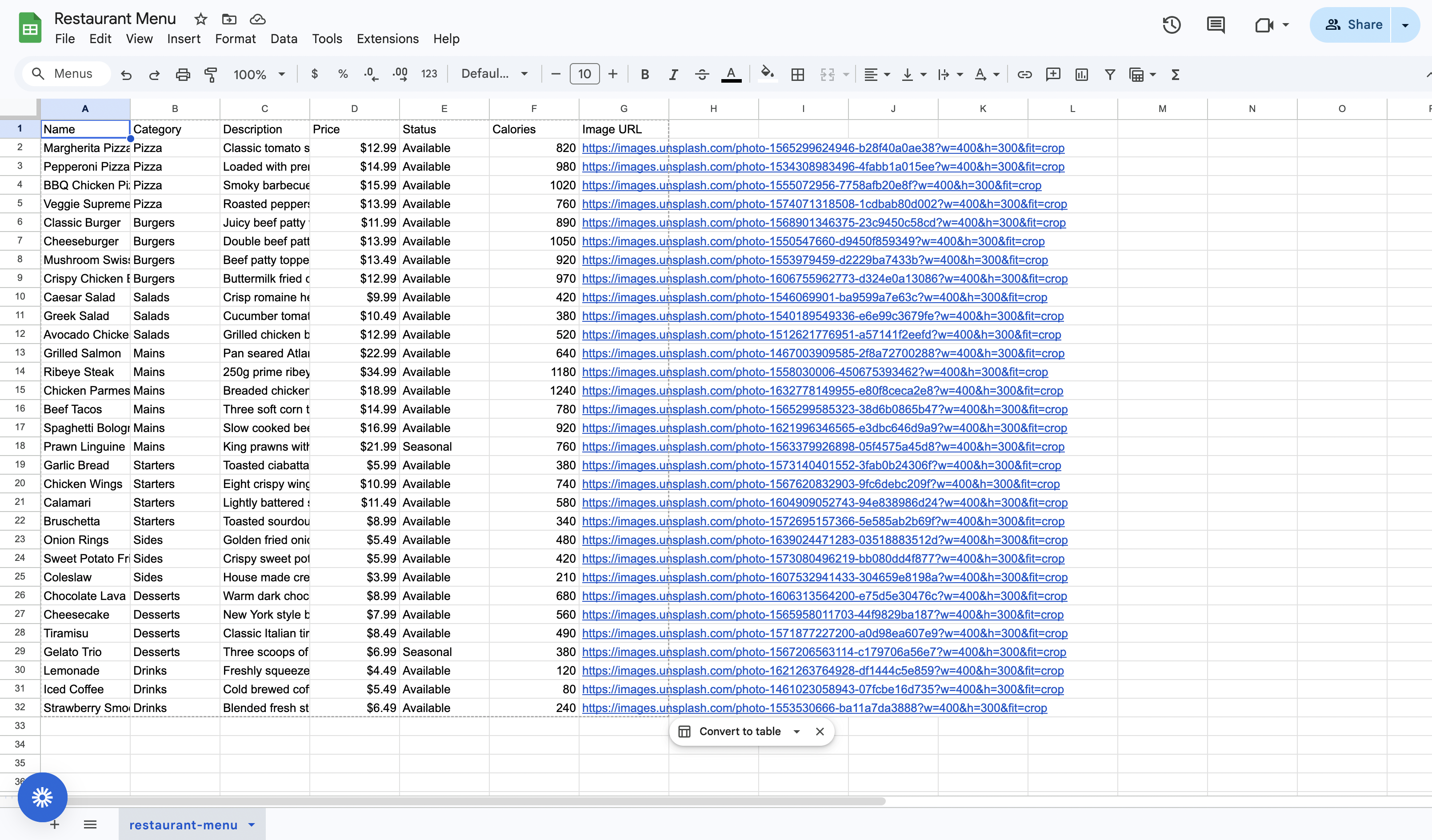
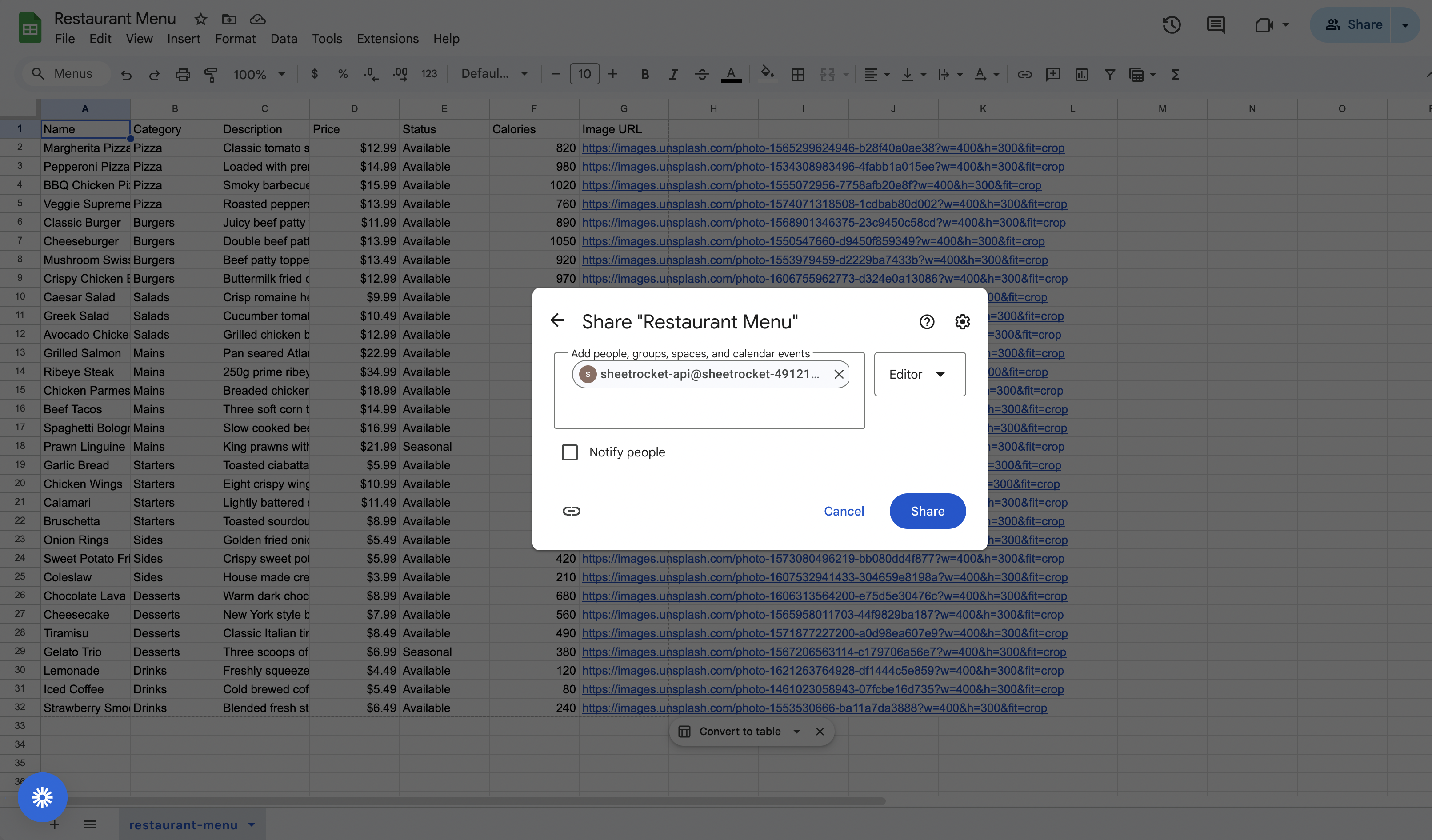
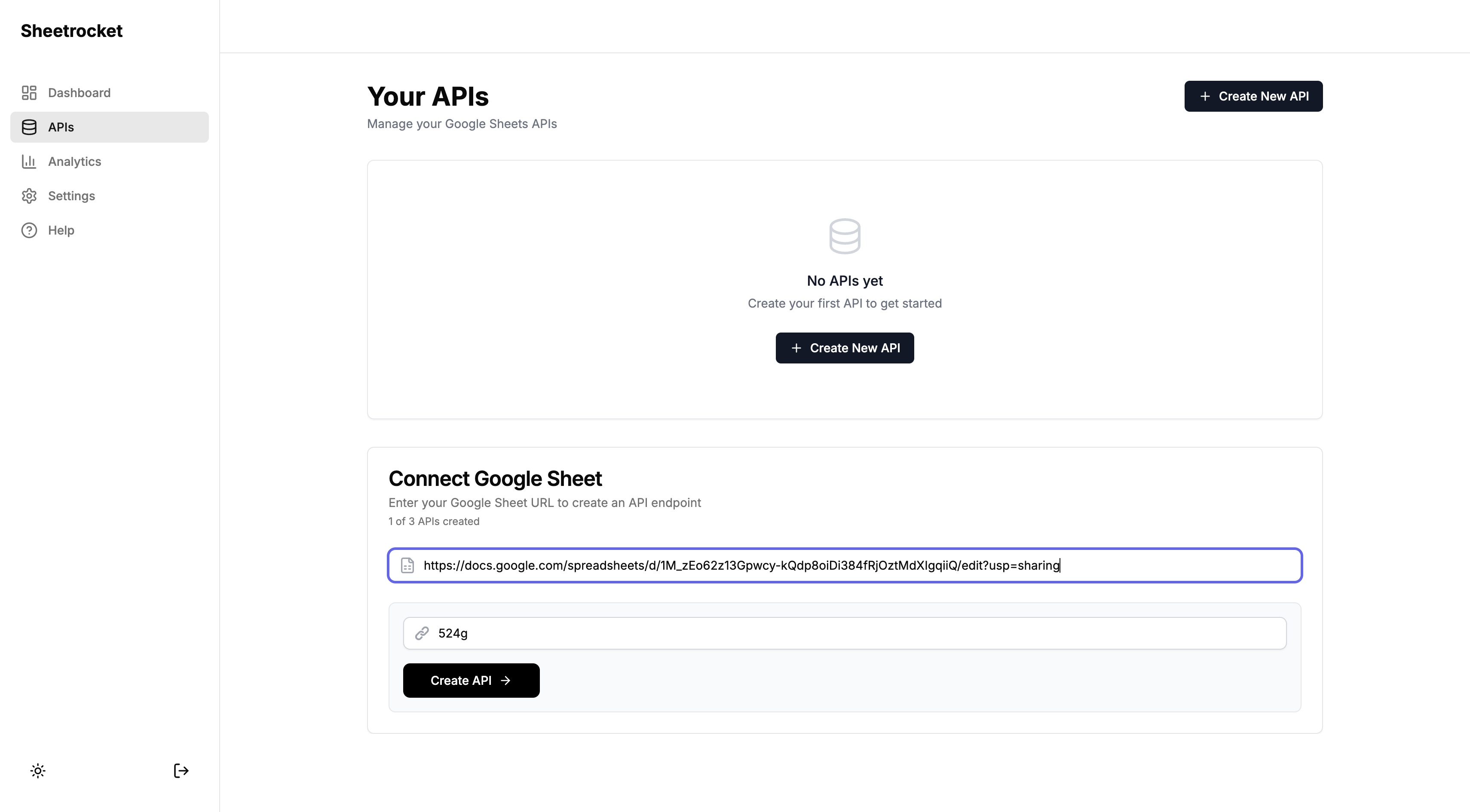
The Sheetrocket dashboard. Paste your Google Sheet URL, and your API is created in seconds.
Step 2: Your API is live immediately
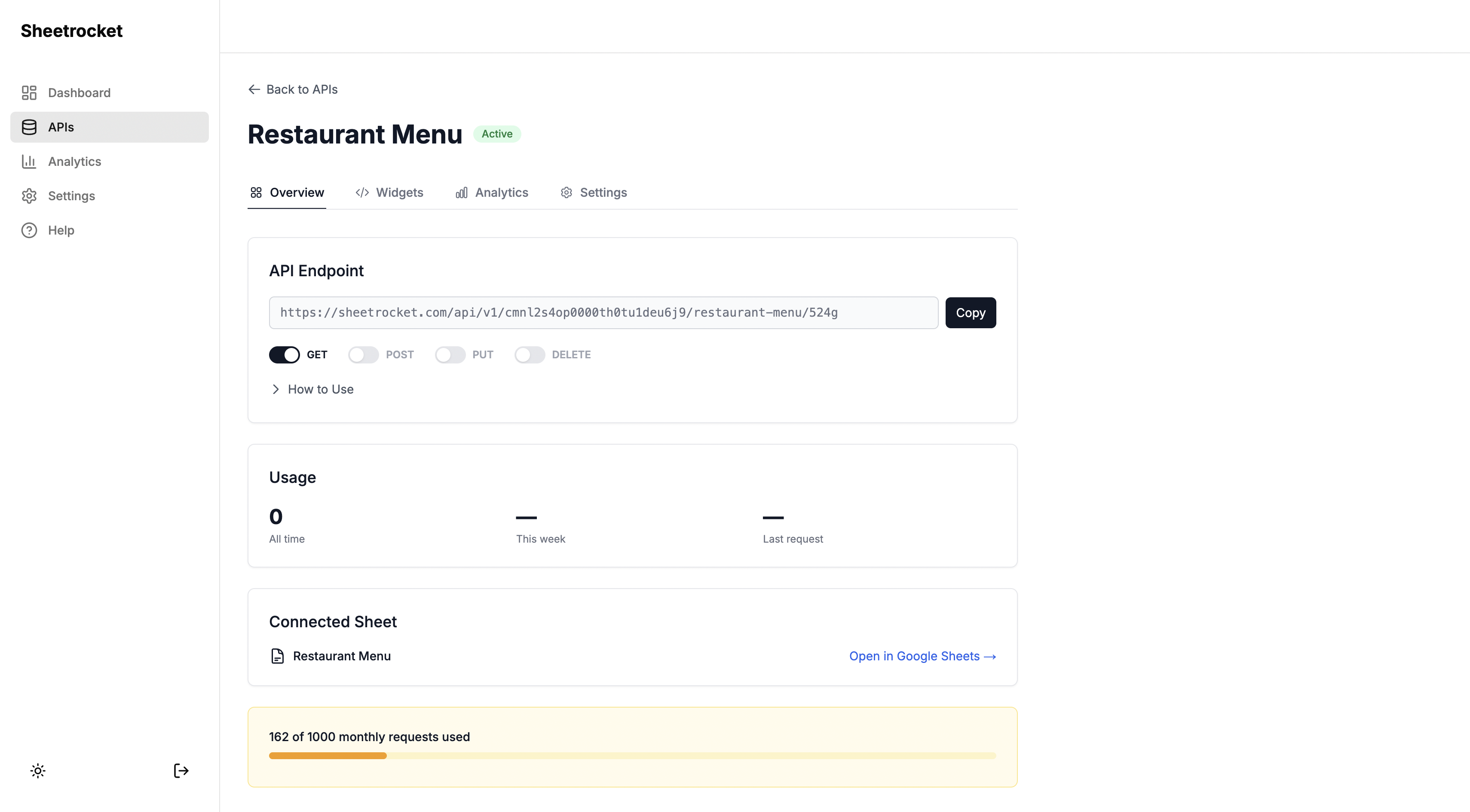
The moment your sheet is connected, SheetRocket generates a full REST API endpoint. On the API details page, you will see the Overview tab first. This is where your API URL lives, along with HTTP method controls. You can toggle GET, POST, PUT, and DELETE on or off, depending on what you want to allow. A code snippet below shows exactly how to start making requests in JavaScript.
The Overview tab on the API details page. Your endpoint URL is ready to use immediately.
Step 3: Move to the Widgets tab
This is where SheetRocket separates itself from every other tool in this list. Click the Widgets tab and you are presented with two options: a Table widget or a Cards widget.
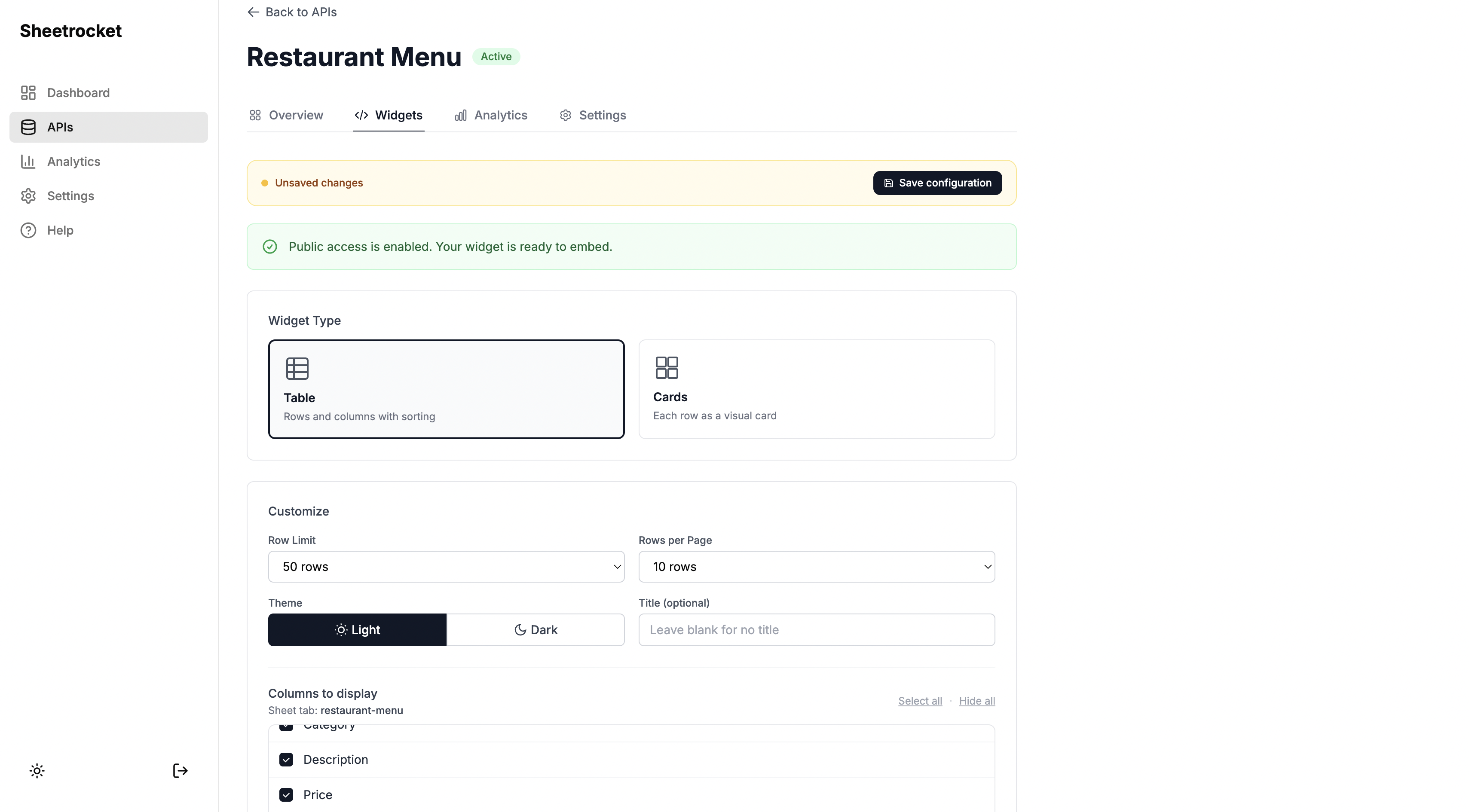 The Widgets tab. Choose between a table layout or a cards layout for your embedded widget.
Step 4: Choose a card template (if using cards)
If you choose the Cards view, SheetRocket offers six distinct card template designs:
Simple: A clean stacked layout that works for any data. Good for contact directories and general content.
Compact: A tighter two-column grid for dense datasets. Good for inventory lists and price tables.
Profile: Title and avatar image prominent. Good for the team directories, speaker lists, and member rosters.
Product: Full image at top with title and price below. Good for restaurant menus, product catalogues, and service listings. If a row has no image URL, the card displays cleanly without an image placeholder.
Status: Color-coded status badges for each record. Green for active, yellow for pending, red for closed, and blue for featured. Good for job boards, property listings, and availability tables.
Horizontal: Image on the left with content on the right, stacked as a list. Good for blog post feeds, news listings, and recipe directories.
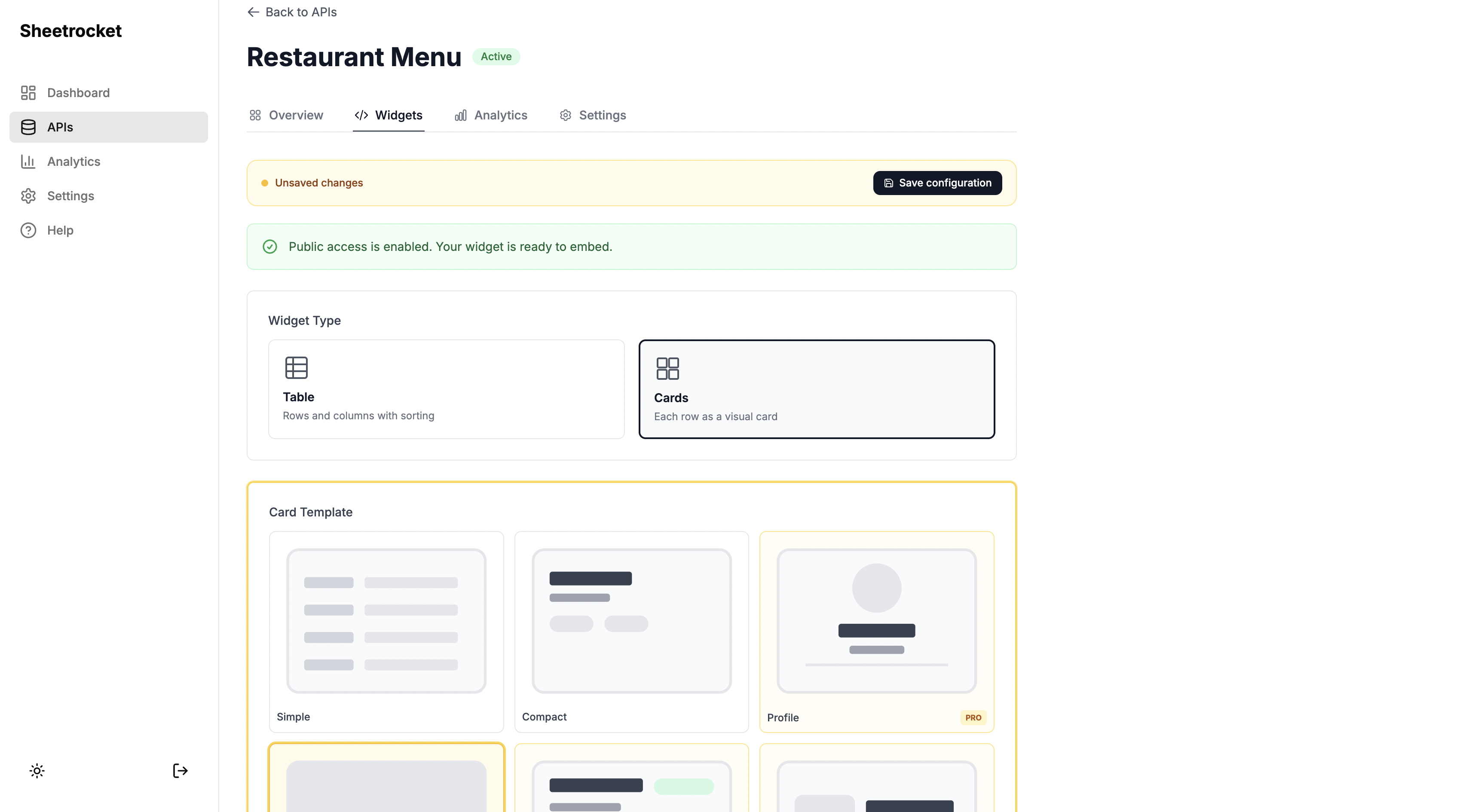 The template picker shows a live visual preview of each design. Pro templates are clearly labeled.
Step 5: Customize the widget
After selecting your template, you get full customization panel:
Sheet Tab: Choose which tab of your spreadsheet to pull data from.
Row Limit: Control how many rows appear in the widget.
Theme: Light or dark, matching your website design.
Title: An optional heading displayed above the widget.
Column Visibility: A checkbox list of every column in your sheet. Uncheck any column to hide it from the widget. This is critical for privacy. If your sheet has sensitive columns like internal pricing, email addresses, or staff notes, you can hide them completely. Hidden columns are never sent to the widget at all. They are filtered on the server before the response leaves SheetRocket.
Row Filtering: Show only rows that match a condition. For example, only show rows where Status equals Active. Supports contains, equals, starts with, and is not empty operators.
Typography and Colors: Customize font size, font weight, font style, text color, text alignment, text transform, and letter spacing for column headers, cell values, and the widget title independently.
Per-Column Styles: Apply different typography settings to individual columns. Make the Price column bold and green while the Description column stays default gray.
 The customization panel. Column visibility, row filtering, and typography controls all in one place.
Step 6: Copy and paste the embed code
When your widget is configured, SheetRocket generates an embed code in real time. It looks like this:
<div
  data-sheetrocket="your-sheet-id"
</div>
<script src="https://sheetrocket.com/widget.js" async></script>
Copy that snippet and paste it into any website. Webflow users paste it into an Embed element. WordPress users paste it into a Custom HTML block. Plain HTML sites just drop it into the body. The widget renders your live Google Sheet data with your chosen design and all your customizations applied.
Your configuration saves automatically. Come back the next day and everything is exactly where you left it.
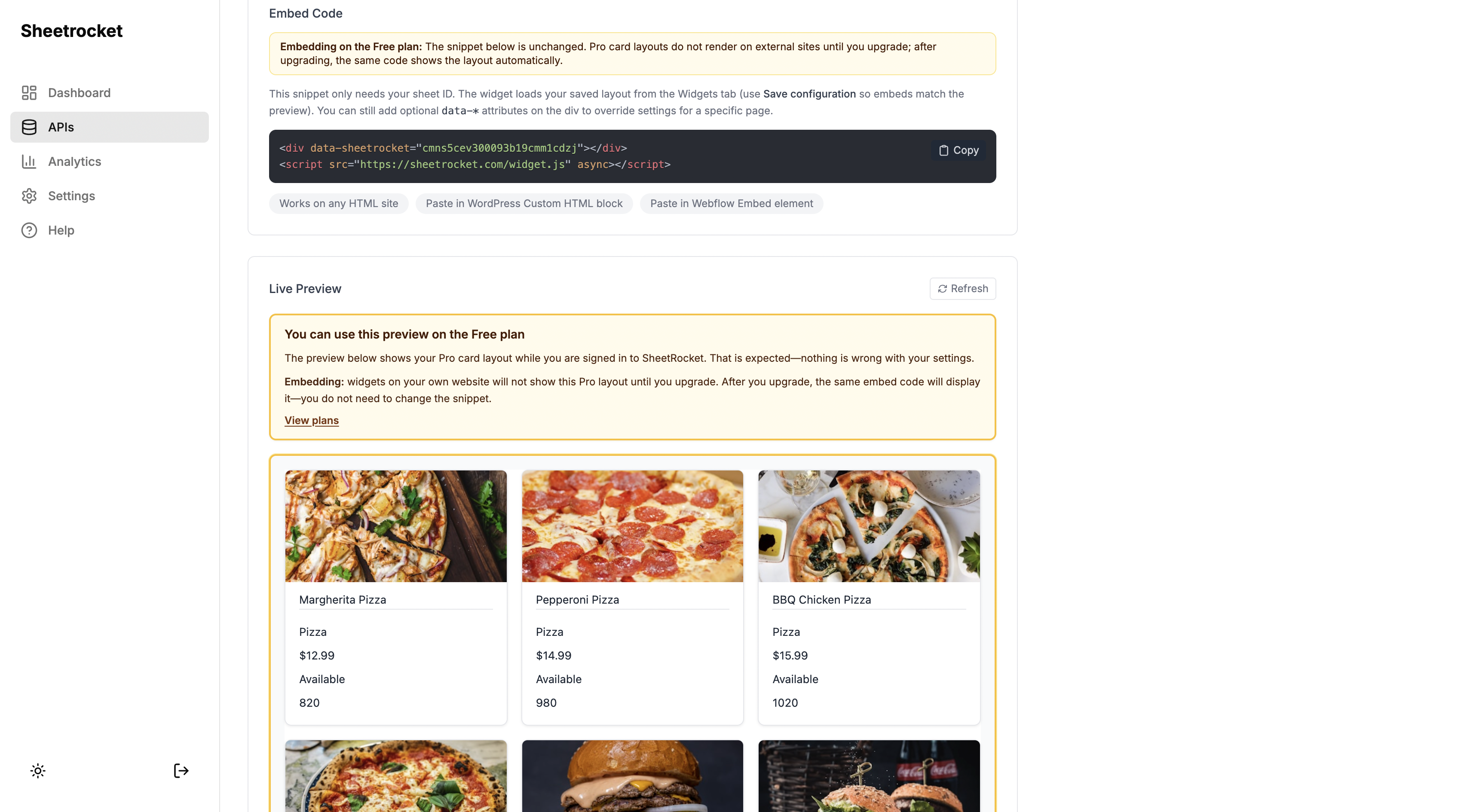
The embed code updates in real time as you change settings. The live preview below it shows exactly what visitors will see.
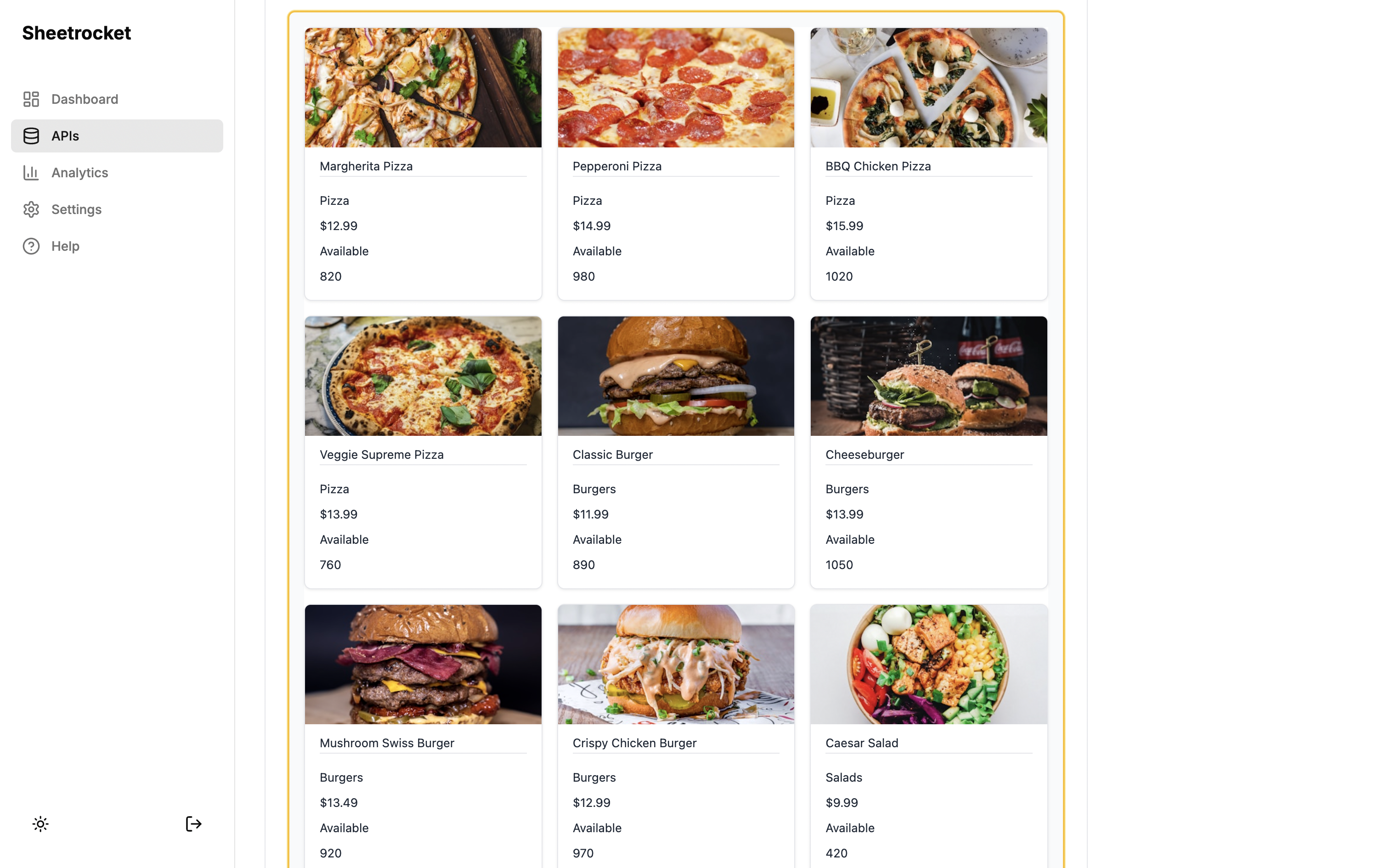
A live Sheetrocket widget embedded on an external website. The data comes directly from a Google Sheet.
Sheetrocket Pricing
| Plan | Price | API Requests | Widgets | Active APIs |
|---|---|---|---|---|
| Free | $0/month | 1,000/month | 2 | 3 |
| Pro | $12/month | 50,000/month | Unlimited | 10 |
| Business | $29/month | 500,000/month | Unlimited | Unlimited |
The free plan includes the "Powered by Sheetrocket" branding on widgets. The Pro plan removes it, which is the primary upgrade trigger for anyone using widgets on a professional or client site.
Who SheetRocket Is For
Sheetrocket works for two very different people. The first is a developer who wants a clean REST API to power an app or a dashboard without setting up a backend. The second is a Webflow designer, a WordPress site owner, or a small business owner who has product data or team information in a Google Sheet and wants it to appear on their website without writing any code.
No other tool in this category serves both audiences. Most alternatives stop at the JSON endpoint and expect developers to do the rest.
What Sheetrocket Does Not Do
Sheetrocket is built specifically for Google Sheets. It does not support Excel Online or other spreadsheet formats. If your data lives in Excel rather than Google Sheets, look at the other options below.
2. Sheety: Free and Fast for Simple Projects
sheety.co
Best for: Developers who need a quick read-only API for personal or prototype projects.
Sheety has been around since 2019 and remains one of the most popular tools in this space because of how simple it is. Paste a Google Sheet URL, click a button, and you have a JSON endpoint. No account setup required on the free tier.
Sheety's dashboard. Clean and minimal with a single focus on generating your API URL.
The free plan is genuinely generous for personal use. For anything production-facing, the limitations show up quickly. Write support is restricted on free tiers, request limits are low, and there is nothing beyond the API itself. No widgets, no visual output, no customization.
Sheety is a solid starting point for a proof of concept or a static site build-time data fetch. It is not the right tool for anything that needs to display data on a website or handle meaningful traffic.
Pricing: Free tier available. Paid plans start at approximately $10 per month.
Best use case: Quick prototypes, personal projects, and read-only API needs where you just need JSON and nothing else.
3. SheetDB: Clean API With Strong Documentation
sheetdb.io
Best for: Developers building applications who need well-documented read and write API access.
SheetDB offers a clean REST API that supports the full range of CRUD operations: create, read, update, and delete. What stands out compared to other tools in this category is the quality of its documentation. If you are integrating Google Sheets data into a custom application, and your team needs clear reference docs; SheetDB delivers that better than most.
SheetDB's documentation is detailed and includes code examples for multiple languages.
It supports filtering rows by column value using query parameters, pagination, and basic authentication. The dashboard is straightforward and shows request usage clearly.
Like every other tool on this list except SheetRocket, SheetDB gives you a JSON endpoint and nothing else. There is no way to display your data on a website without building something custom on top of it.
Pricing: Free tier available with 500 monthly requests. Paid plans start at approximately $9 per month.
Best use case: Application backends where a developer needs solid documentation and reliable write support.
4. SheetBest: Simple API With a Clean Interface
sheet.best
Best for: Users who want a polished dashboard experience with minimal configuration.
SheetBest positions itself as the easiest way to turn a Google Sheet into an API, and the dashboard backs that up. The interface is clean, the setup flow is short, and you can have an endpoint ready in under two minutes.
It supports GET, POST, PUT, PATCH, and DELETE operations and handles basic filtering well. For straightforward read and write use cases, it competes well with both Sheet2API and SheetDB.
The pricing puts it in a similar bracket to Sheet2API, which is where it tends to lose users to Sheetrocket. For a similar price you get more with Sheetrocket, particularly if you need to display data visually on a website.
Pricing: Free tier with limited requests. Paid plans start at approximately $9 per month.
Best use case: Users who want a polished dashboard and straightforward API access without needing any visual output features.
5. Airtable: When You Need More Than a Spreadsheet
airtable.com
Best for: Teams who have outgrown Google Sheets and need a proper database with API access.
Airtable is not a direct Sheet2API alternative in the same way sense as the other tools here. It is a relational database with a spreadsheet interface and a built-in REST API. If your frustration with Sheet2API comes from Google Sheets itself being too limited, with no relationships between tables, slow performance on large datasets, and limited formula power. Airtable solves those problems.
The API is well-documented and supports complex queries that go beyond what any of the Google Sheets tools can offer. Airtable also offers views, automations, forms, and integrations that Google Sheets simply does not have.
The tradeoff is price and complexity. Airtable is significantly more expensive than the other tools here and requires learning a new platform. If your data is already well-managed in Google Sheets, and you just need to expose it, Airtable is more than you need.
Pricing: Free tier available. Paid plans start at $20 per user per month.
Best use case: Teams who need a relational database with API access and are ready to move off Google Sheets entirely.
Side-by-Side Comparison
| Feature | SheetRocket | Sheet2API | Sheety | SheetDB | SheetBest |
|---|---|---|---|---|---|
| REST API | Yes | Yes | Yes | Yes | Yes |
| Embeddable widgets | Yes | No | No | No | No |
| Card templates | 6 designs | No | No | No | No |
| Table widget | Yes | No | No | No | No |
| Column visibility control | Yes | No | No | No | No |
| Row filtering in widget | Yes | No | No | No | No |
| Typography customization | Yes | No | No | No | No |
| Works on any website | Yes | No | No | No | No |
| Free plan | Yes | Trial only | Yes | Yes | Yes |
| Starting paid price | $12/month | ~£25/month | ~$10/month | ~$9/month | ~$9/month |
| Excel Online support | No | Yes | No | No | No |
Which Tool Should You Choose
Here is a direct answer depending on your situation:
You are a developer who needs a quick JSON API for a personal project or prototype, and price is the top concern: Use Sheety. It is free, it is fast, and it requires almost no setup.
You are a developer building an application and need solid documentation and reliable write access: Use SheetDB. The documentation quality justifies the price for production application backends.
You need to display Google Sheet data on a website, and you do not want to write any code to do it: Use SheetRocket. It is the only tool in this category that lets you embed your sheet data as a styled, customizable widget on any website. The other tools on this list give you a JSON endpoint and leave the display layer entirely to you.
You are a developer who needs the API today and knows you will eventually need to display that data on a website: Use SheetRocket. You get both from the start without having to build a custom frontend on top of your API later.
You need Excel Online support alongside Google Sheets: Use Sheet2API. It is one of the few tools that handles both.
You have outgrown Google Sheets and need relationships between tables, advanced automations, and a proper database: Use Airtable. You are solving a different problem than the other tools on this list address.
The Honest Verdict on Sheet2API
Sheet2API is a solid tool that has been around long enough to prove it works. It handles authentication, supports webhooks, and offers filtering. For a developer who needs a reliable API with Excel Online support and does not need anything visual, it remains a legitimate choice.
The problem is value. At its price point, you are paying for a pure API tool in a market where a competitor now offers the same API capability plus six card template designs, an embeddable table widget, column visibility controls, row filtering, typography customization, and a free plan with 1,000 monthly requests at a lower starting price.
For most users discovering this category today, Sheetrocket is the better place to start.
Get Started With Sheetrocket
SheetRocket is free to start. No credit card required. Connect your Google Sheet, get your API endpoint, and build your first embeddable widget in under five minutes.
Start for free at sheetrocket.com
Frequently Asked Questions
Is there a free Sheet2API alternative?
Yes. Sheetrocket, Sheety, and SheetDB all offer free plans. SheetRocket's free plan includes 1,000 API requests per month, 2 embeddable widgets, and 3 active APIs — which is more generous than most free tiers in this category.
Can I embed Google Sheets data on a Webflow site?
Yes, with Sheetrocket. Connect your sheet, configure your widget, and paste the generated embed code into a Webflow Embed element. Your live sheet data appears on your site automatically. The other tools on this list do not offer an embed code. They only provide a JSON API endpoint that requires custom code to display.
What is the difference between a Google Sheets API tool and the Google Sheets API itself?
The Google Sheets API is Google's own API for reading and writing spreadsheet data programmatically. Using it directly requires setting up OAuth credentials, handling authentication, and writing code to manage requests. Tools like SheetRocket and Sheet2API sit on top of the Google Sheets API and handle all of that for you, giving you a simple endpoint you can use immediately without any setup.
Does SheetRocket work with private Google Sheets?
Yes. Sheetrocket connects to your sheets via a service account that you share editor access with:
sheetrocket-api@sheetrocket-491214.iam.gserviceaccount.com
Your sheet stays private. Only the data you choose to expose through Sheetrocket becomes accessible via your API or widget, and you control exactly which columns are visible.
What happens to my widget if I edit my Google Sheet?
Your changes appear automatically. Sheetrocket fetches live data on every request, so your widget always reflects the current state of your sheet. There is no manual sync or rebuild required.
Can I use Sheetrocket on WordPress?
Yes. Paste the embed code into a Custom HTML block in the WordPress block editor. Your widget will render anywhere you can add custom HTML, including page builders like Elementor and Divi.
Last updated: April 2026
Sheetrocket is built by Allen Jones, a solo founder based in Ghana. If you found this post useful, the best way to support it is to try Sheetrocket at sheetrocket.com.